Design patterns for implementing Auth0 authentication across multiple frontend applications with shared backend services and role-based access control.
Introduction
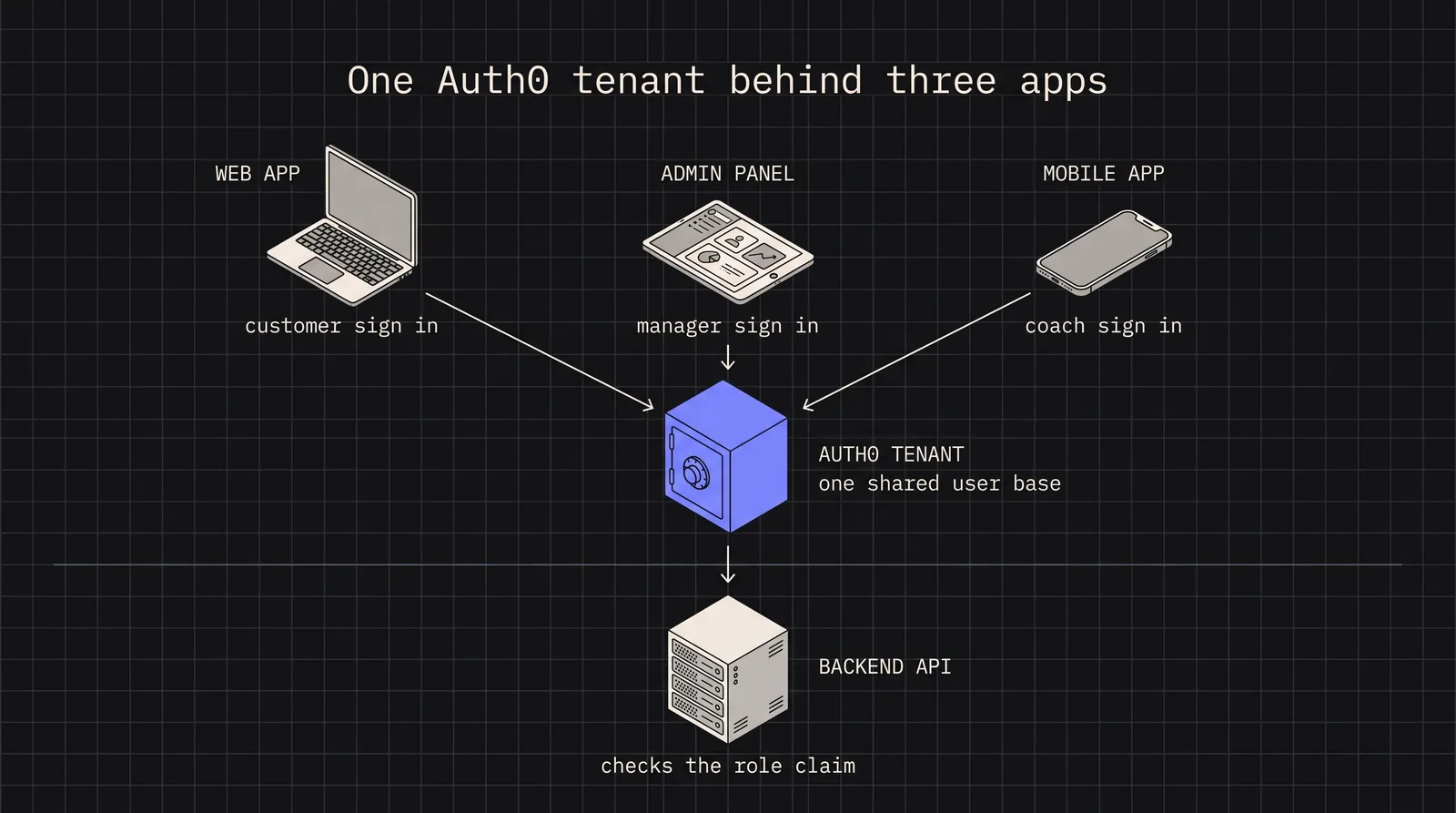
Building a modern SaaS platform often means supporting multiple frontend applications - a customer-facing web app, an admin dashboard, a mobile app for coaches, and perhaps more. Each application has different user roles, different access requirements, and different security considerations. Yet they all need to authenticate against the same user base and access shared backend services.
This is the multi-application authentication challenge: how do you maintain a single source of truth for user identity while supporting diverse client applications with varying security requirements? The naive approach of creating separate Auth0 tenants for each app quickly becomes a nightmare of duplicated users, inconsistent permissions, and maintenance overhead.
In this article, I’ll walk through a battle-tested architecture for handling multi-application authentication with Auth0. We’ll cover tenant configuration, role-based access control (RBAC), token validation middleware, and the common pitfalls that can undermine your security posture.
OAuth2/OIDC fundamentals for multi-app scenarios
Before diving into implementation, let’s establish the OAuth2/OIDC concepts that make multi-application authentication possible.
OAuth2 handles authorization (what a user can do), while OpenID Connect (OIDC) extends OAuth2 with authentication (who a user is). Together, they provide the foundation for secure, delegated access across applications.
The key players in our architecture:
Component
Role
Authorization Server
Auth0 tenant - issues tokens and manages user sessions
Resource Server
Your backend APIs - validates tokens and enforces permissions
Clients
Frontend apps - redirect users to Auth0, receive tokens
Users
People authenticating - may have different roles per app
In a multi-app setup, all clients share the same Authorization Server (Auth0 tenant), but each client can request different scopes and handle tokens differently based on its security requirements.
Auth0 tenant configuration for multiple applications
The key to scaling authentication across multiple frontends is proper Auth0 tenant configuration. Here’s the structure that works:
auth0-config.ts
// Shared Auth0 configuration for all applications
Pro Tip: Use a single API identifier (audience) for all applications hitting the same backend. This allows tokens from any app to be validated by the same middleware.
Application type selection
Choose the right Auth0 Application type for each frontend:
Single Page Application (SPA): For React/Vue/Angular apps using PKCE flow
Regular Web Application: For server-rendered apps that can securely store client secrets
Native: For mobile apps using PKCE with custom URI schemes
Each application in Auth0 gets its own client ID, but they all share the same tenant, API, and user database. This is the foundation of multi-app authentication.
Implementing role-based access control
With multiple applications serving different user types, RBAC becomes essential. Auth0’s Authorization Core feature lets you define roles and permissions that travel with the user’s token.
Warning: Always enable Refresh Token Rotation in Auth0’s Application settings for native apps. This invalidates old refresh tokens when a new one is issued, mitigating token theft.
Security best practices and common pitfalls
After implementing Auth0 across dozens of applications, here are the patterns that protect against real-world attacks:
Cookie domain configuration
When your apps span multiple subdomains (app.company.com, admin.company.com), session cookies must be configured correctly:
session-config.ts
// Auth0 Universal Login custom domain settings
const cookieConfig = {
// Set cookie domain to allow sharing across subdomains
domain: '.your-company.com', // Note the leading dot
// Always use these security settings
secure: true, // HTTPS only
httpOnly: true, // No JavaScript access
sameSite: 'lax'// CSRF protection while allowing redirects
};
Scope management pitfalls
Pitfall
Solution
Over-scoped tokens
Request only necessary scopes per application
Scope creep
Audit and document scope requirements quarterly
Missing audience
Always include audience parameter to get access tokens
Cached stale scopes
Clear token cache when scope requirements change
Token storage security
token-storage-best-practices.ts
// NEVER do this - XSS vulnerable
localStorage.setItem('access_token', token); // BAD
// For SPAs - let Auth0 SDK handle storage
const auth0 = new Auth0Client({
cacheLocation: 'memory', // Most secure for SPAs
useRefreshTokens: false// Use silent auth instead
});
// For web apps with backend - use HTTP-only cookies
// Set via your backend after token exchange
res.cookie('session', encryptedSession, {
httpOnly: true,
secure: true,
sameSite: 'strict',
maxAge: 86400000// 24 hours
});
API key fallback for service-to-service
Not everything needs user authentication. For backend services communicating with each other:
Building a multi-application authentication system with Auth0 requires careful planning but pays dividends in maintainability and security. The key principles to remember:
Single tenant, multiple applications: Keep all apps in one Auth0 tenant with separate Application configurations
Shared API audience: Use one API identifier so all apps can access the same backend services
Role claims in tokens: Inject roles via Auth0 Actions to enable backend RBAC
Application-appropriate token handling: SPAs use silent auth, native apps use refresh token rotation
Defense in depth: Validate tokens, check roles, and enforce resource-level permissions
The architecture described here has scaled to support platforms with millions of users across web, mobile, and admin interfaces. The upfront investment in proper configuration prevents the security debt that accumulates when authentication is treated as an afterthought.
Start with the middleware patterns, add roles incrementally, and always test your token expiry flows before users discover them in production.