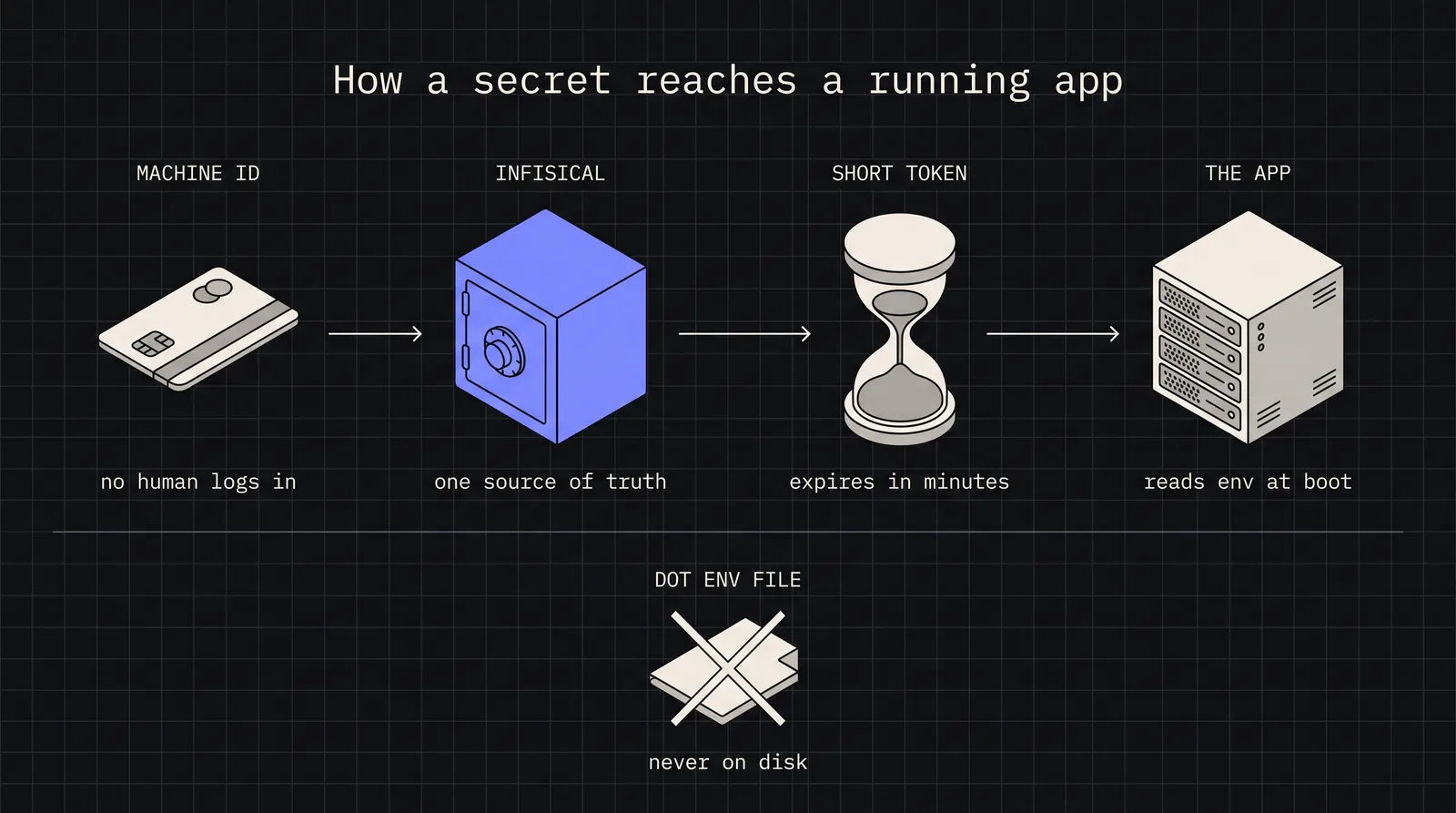
Implement secure secrets management using Infisical, an open-source platform for managing API keys, database credentials, and environment variables across development and production.
Introduction
Every developer has done it at least once: committed a .env file to version control, shared API keys over Slack, or copy-pasted database credentials into a deployment script. These shortcuts seem harmless until they become security incidents. The 2023 CircleCI breach exposed thousands of customer secrets stored in environment variables. The Uber hack originated from hardcoded credentials in a PowerShell script. Secrets management isn’t just a best practice - it’s a critical security control.
The challenge is that secrets are everywhere in modern applications. Database connection strings, API keys for third-party services, JWT signing keys, OAuth client secrets, encryption keys - each one is a potential attack vector if mishandled. Traditional approaches like .env files provide no access control, no audit logging, no rotation capabilities, and no way to revoke compromised credentials without redeploying.
Infisical offers an open-source solution to this problem. It provides centralized secrets management with features previously only available in enterprise tools like HashiCorp Vault or AWS Secrets Manager - but with a developer experience designed for modern workflows. In this article, we’ll explore how to integrate Infisical into your development and production environments, from CLI setup to Node.js SDK integration.
Why Infisical over alternatives
Before diving into implementation, let’s understand where Infisical fits in the secrets management landscape.
Feature
.env files
AWS Secrets Manager
HashiCorp Vault
Infisical
Self-hosted option
N/A
No
Yes
Yes
Cloud option
No
Yes
Yes (HCP)
Yes
CLI for local dev
No
Limited
Yes
Yes
Native SDK support
No
Yes
Yes
Yes
Secret versioning
No
Yes
Yes
Yes
Access control
No
IAM-based
Policy-based
Role-based
Audit logging
No
Yes
Yes
Yes
Learning curve
None
Moderate
Steep
Low
Open source
N/A
No
Yes
Yes
Infisical occupies a sweet spot: it’s open-source and self-hostable like Vault, but with the developer experience and managed cloud option of modern SaaS tools. The CLI-first approach makes local development seamless, while the SDK integration handles production deployments without the operational complexity of running Vault clusters.
Pro Tip: For teams already invested in AWS, Secrets Manager integrates naturally with IAM. But if you need multi-cloud support or want to avoid vendor lock-in, Infisical’s portability becomes a significant advantage.
Setting up your Infisical project
Creating a project and environments
Start by creating an account at infisical.com or deploying the self-hosted version. Once logged in, create a new project:
Project structure in Infisical
my-application/
├──Development# Local development secrets
├──Staging# Pre-production testing
├──Production# Live environment secrets
└──CI/CD# Build and deployment secrets
Each environment maintains its own set of secrets with independent access controls. A developer might have read access to Development secrets but no access to Production. This separation enforces the principle of least privilege without complicating the developer workflow.
Organizing secrets with folders
For larger applications, organize secrets into logical folders:
Recommended folder structure
/
├──database/
│├──DB_HOST
│├──DB_PORT
│├──DB_USER
│└──DB_PASSWORD
├──auth/
│├──JWT_SECRET
│├──OAUTH_CLIENT_ID
│└──OAUTH_CLIENT_SECRET
├──services/
│├──STRIPE_API_KEY
│├──SENDGRID_API_KEY
│└──AWS_ACCESS_KEY_ID
└──app/
├──SESSION_SECRET
└──ENCRYPTION_KEY
This structure makes it easy to grant granular access - a payment service team might only need access to /services/STRIPE_* without seeing database credentials.
CLI setup for local development
The Infisical CLI transforms how developers work with secrets locally. Instead of managing .env files manually, the CLI pulls secrets directly from Infisical and injects them into your development environment.
Navigate to your project directory and initialize Infisical:
Project initialization
cd~/projects/my-application
# Initialize and link to your Infisical project
infisicalinit
# This creates .infisical.json with project configuration
cat.infisical.json
.infisical.json
{
"workspaceId": "64a1b2c3d4e5f6a7b8c9d0e1",
"defaultEnvironment": "dev",
"gitBranchToEnvironmentMapping": {
"main": "prod",
"staging": "staging",
"develop": "dev"
}
}
Note: The gitBranchToEnvironmentMapping feature automatically selects the correct environment based on your current Git branch - no manual switching required.
Running applications with secrets
The infisical run command injects secrets as environment variables:
The beauty of this approach is that secrets never touch your filesystem. They exist only in the process environment for the duration of the command execution.
Verify secrets are injected
# This prints all environment variables (careful in shared terminals!)
infisicalrun--printenv | grep-E"^(DB_|JWT_|API_)"
# Output:
# DB_HOST=localhost
# DB_PORT=5432
# DB_USER=myapp
# DB_PASSWORD=secret123
# JWT_SECRET=your-jwt-secret-key
Warning: Never commit .infisical.json with sensitive workspace IDs to public repositories. Add it to .gitignore or use environment variables for the workspace ID in CI/CD.
Node.js SDK integration
For production applications, the SDK provides programmatic access to secrets with caching, automatic refresh, and error handling.
Installation and initialization
Installing the SDK
npminstall@infisical/sdk
src/config/secrets.ts
import { InfisicalClient } from'@infisical/sdk';
// Initialize the client
const infisical = new InfisicalClient({
// For machine identities (recommended for production)
Warning: Review access logs regularly. Unexpected secret access patterns often indicate misconfiguration or potential security incidents.
Conclusion
Secrets management is a solved problem - the challenge is adoption. Infisical removes the friction that keeps teams relying on insecure practices. The CLI makes local development seamless, the SDK handles production workloads, and the CI/CD integrations fit into existing pipelines without major refactoring.
Key takeaways:
Stop committing .env files: Use infisical run to inject secrets at runtime without touching the filesystem
Separate by environment: Maintain strict boundaries between dev, staging, and production secrets
Use the SDK for production: Programmatic access with caching provides reliability and performance
Implement rotation workflows: Version support enables zero-downtime secret updates
Audit everything: Centralized logging provides visibility into who accessed what and when
The migration path is incremental. Start with one service, prove the workflow, then expand. Within weeks, your team will wonder how they ever managed secrets any other way.