Design scalable image storage solutions using Supabase Storage, with bucket organization, access policies, image transformations, and CDN optimization.
Introduction
Every modern application eventually faces the same challenge: where do you store user-uploaded images? The naive approach of dumping files into a single folder works until you hit 10,000 images and your file listings timeout. Add requirements for access control, image resizing, and global delivery, and suddenly image storage becomes a serious architectural decision.
Supabase Storage offers an elegant solution built on familiar foundations. Under the hood, it’s S3-compatible object storage with PostgreSQL-powered access control. This means you get the scalability of cloud object storage combined with the expressive power of Row Level Security (RLS) policies you already know from Supabase’s database layer.
In this article, we’ll build a production-ready image storage architecture. We’ll cover bucket organization strategies, secure upload patterns from Node.js, on-the-fly image transformations, and CDN integration. By the end, you’ll have a blueprint for handling everything from user avatars to high-resolution product galleries.
Understanding Supabase Storage fundamentals
Supabase Storage is built on three core concepts: buckets, objects, and policies. Understanding how these interact is essential for designing a scalable architecture.
Buckets as logical containers
A bucket is a top-level container for organizing files. Think of it like a root folder with special properties:
bucket-types.ts
// Supabase bucket configuration options
interfaceBucketConfig {
id: string; // Unique bucket name (no spaces, lowercase)
public: boolean; // Whether objects are publicly accessible
public: false, // Private by default, signed URLs for access
fileSizeLimit: 50 * 1024 * 1024// 50MB
}
};
Pro Tip: Create separate buckets for different access patterns rather than mixing public and private files. This simplifies policy management and prevents accidental exposure.
Public vs private bucket strategies
The choice between public and private buckets has significant implications:
Aspect
Public Bucket
Private Bucket
Access
Direct URL, no auth needed
Requires signed URL or RLS policy
Caching
Full CDN caching
Limited caching with signed URLs
Use case
Avatars, logos, public assets
User documents, private media
URL format
storage.supabase.co/.../public/...
Signed URL with expiry token
Setting up Supabase client for storage operations
Before uploading files, you need a properly configured Supabase client. The configuration differs between client-side and server-side contexts.
Server-side client with service role
For Node.js backend operations, use the service role key for full storage access:
Warning: The service role key bypasses RLS policies entirely. Only use it in trusted server environments, never in client-side code or edge functions that could expose the key.
Implementing structured upload patterns
A well-designed path structure makes files discoverable, enables efficient policies, and prevents collisions. Here’s a pattern that scales:
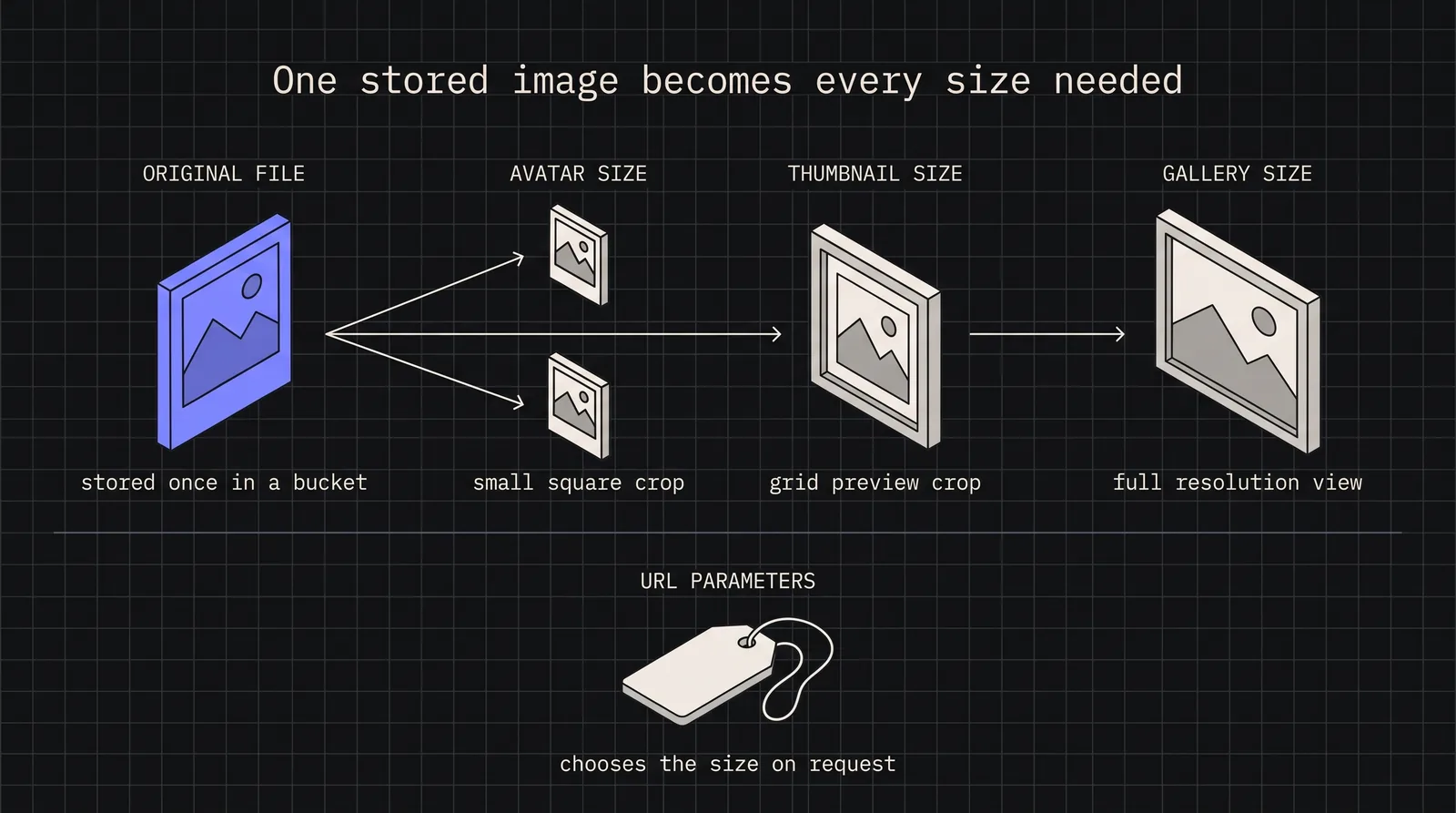
One of Supabase Storage’s most powerful features is on-the-fly image transformation. Instead of pre-generating thumbnails, you request transformed versions via URL parameters.
throw new Error(`Unknown preset: ${category}.${size}`);
}
returngetTransformedUrl(url, preset);
}
Note: Image transformations are only available for Pro plan and above. Free tier projects must handle transformations externally or pre-generate variants.
Row Level Security for storage access
Supabase Storage integrates with PostgreSQL RLS policies, giving you fine-grained access control using familiar SQL syntax.
Bucket policy fundamentals
Storage policies are defined in the storage.objects table and control four operations: SELECT (download), INSERT (upload), UPDATE (overwrite), and DELETE.
policies/storage-policies.sql
-- Policy: Users can upload to their own folder
CREATEPOLICY"Users can upload own files"
ONstorage.objects
FORINSERT
TO authenticated
WITHCHECK (
bucket_id = 'media'
AND (storage.foldername(name))[1] = auth.uid()::text
);
-- Policy: Users can view their own files
CREATEPOLICY"Users can view own files"
ONstorage.objects
FORSELECT
TO authenticated
USING (
bucket_id = 'media'
AND (storage.foldername(name))[1] = auth.uid()::text
);
-- Policy: Users can delete their own files
CREATEPOLICY"Users can delete own files"
ONstorage.objects
FORDELETE
TO authenticated
USING (
bucket_id = 'media'
AND (storage.foldername(name))[1] = auth.uid()::text
);
-- Policy: Public avatar access (for public bucket)
CREATEPOLICY"Public avatar access"
ONstorage.objects
FORSELECT
TO public
USING (bucket_id = 'avatars');
-- Policy: Authenticated users upload avatars to own folder
CREATEPOLICY"Users upload own avatar"
ONstorage.objects
FORINSERT
TO authenticated
WITHCHECK (
bucket_id = 'avatars'
AND (storage.foldername(name))[1] = auth.uid()::text
-- Policy: Only admins can upload to shared folder
CREATEPOLICY"Admins upload to shared"
ONstorage.objects
FORINSERT
TO authenticated
WITHCHECK (
bucket_id = 'media'
AND (storage.foldername(name))[1] = 'shared'
ANDEXISTS (
SELECT1FROMpublic.profiles
WHEREprofiles.id = auth.uid()
ANDprofiles.role = 'admin'
)
);
-- Policy: File size limit enforcement via metadata
-- Note: Actual size limit is set on bucket, this adds conditional logic
CREATEPOLICY"Premium users larger uploads"
ONstorage.objects
FORINSERT
TO authenticated
WITHCHECK (
bucket_id = 'media'
AND (
-- Regular users: 5MB limit
(
NOTEXISTS (SELECT1FROM subscriptions WHERE user_id = auth.uid() AND tier = 'premium')
AND octet_length(name) <= 5 * 1024 * 1024
)
OR
-- Premium users: 50MB limit
EXISTS (SELECT1FROM subscriptions WHERE user_id = auth.uid() AND tier = 'premium')
)
);
Warning: The storage.foldername() function returns an array of path segments. Always access the correct index for your path structure. Index starts at 1, not 0.
CDN optimization for global delivery
Supabase Storage includes CDN integration, but optimizing for global performance requires understanding caching behavior and URL patterns.
Cache control strategies
utils/cache-config.ts
// Cache control values for different asset types
exportconst CACHE_CONTROL = {
// Avatars: Long cache, versioned via path
avatar: 'public, max-age=31536000, immutable', // 1 year
// User uploads: Moderate cache, may change
upload: 'public, max-age=86400, stale-while-revalidate=3600', // 1 day + SWR
console.warn(`Slow storage operation: ${operation} took ${duration}ms`);
}
}
// Wrapper for monitored uploads
exportasyncfunctionmonitoredUpload(
uploadFn: () =>Promise<any>,
operationName: string
) {
const start = Date.now();
try {
const result = awaituploadFn();
trackStorageMetrics(operationName, start, true);
return result;
} catch (error) {
trackStorageMetrics(operationName, start, false);
throw error;
}
}
Conclusion
Building a production image storage system with Supabase means leveraging familiar patterns with powerful infrastructure. The key architectural decisions covered here:
Bucket organization: Separate public and private content into distinct buckets with appropriate MIME type and size restrictions
Path structure: Use userId/folder/year/month/filename patterns for discoverable, policy-friendly organization
RLS policies: Write SQL policies that match your path structure, using storage.foldername() to extract path segments
Image transformations: Generate thumbnails and responsive variants on-the-fly rather than pre-processing
Signed URLs: Use expiring URLs for private content with appropriate cache headers
CDN optimization: Set cache control headers based on content type and update frequency
Supabase Storage removes the infrastructure complexity of managing object storage while giving you PostgreSQL’s expressive power for access control. Combined with edge transformations and global CDN delivery, it handles the image storage needs of most applications without requiring separate services for processing or delivery.
Start with the bucket structure and upload patterns, add RLS policies incrementally as access requirements emerge, and lean on transformations to avoid the thumbnail generation pipeline that plagues many applications.