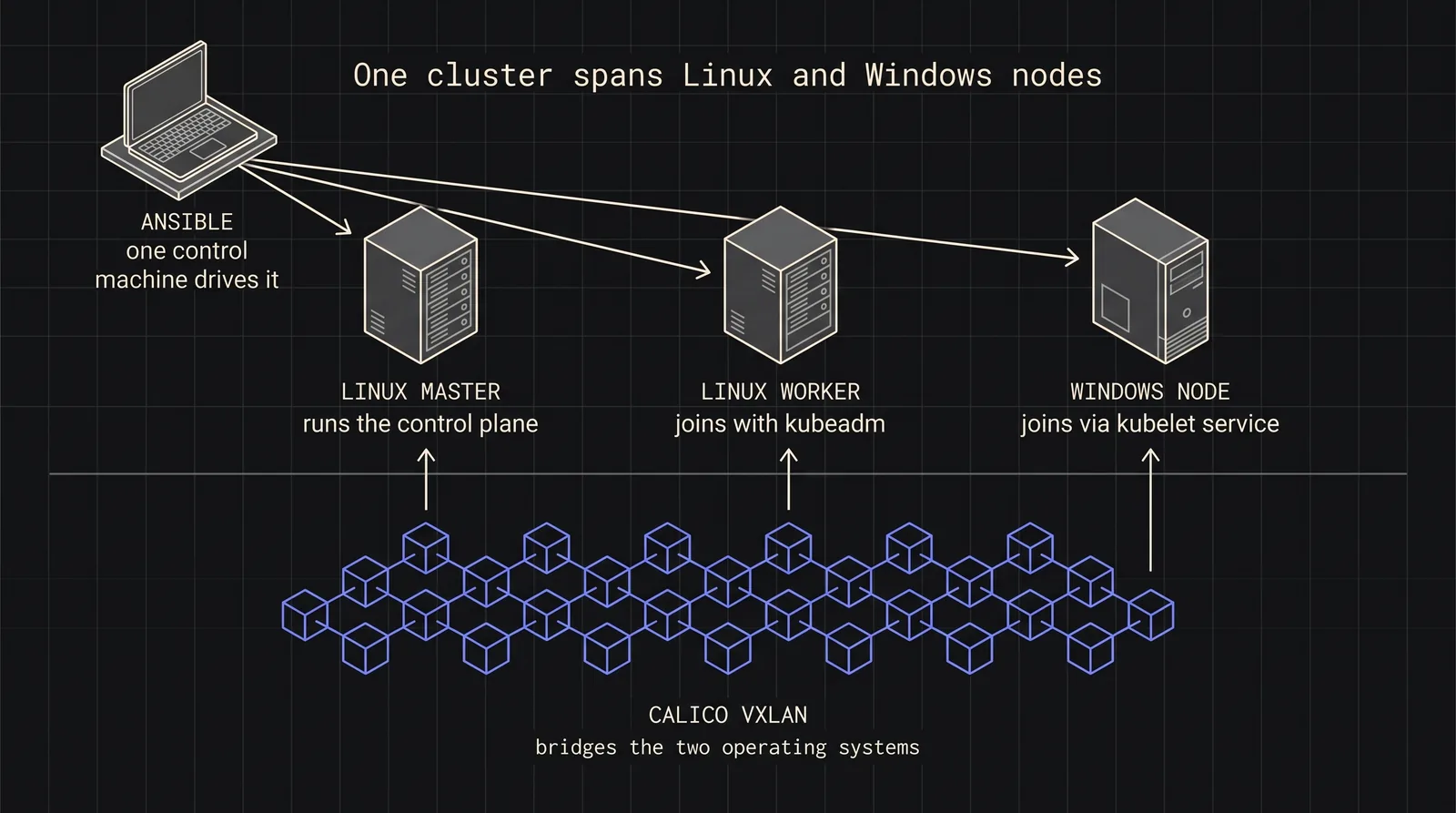
Hybrid Kubernetes Cluster: Detailed Setup with Linux and Windows Nodes
A detailed guide to creating a hybrid Kubernetes cluster, incorporating script content and explaining each step in depth.
Automating Kubernetes Cluster Deployment on Windows with Calico Networking
Introduction
The automation of Kubernetes deployments is crucial for scaling complex, modern infrastructure environments effectively. This approach minimizes the need for manual configurations, mitigates the risk of human error, and ensures consistency across all environments. In this article, we provide an advanced discussion on the automation of Kubernetes deployments on Windows nodes, using Calico as a networking solution. By the end of this article, you will gain a deep understanding of how to build an efficient, highly scalable Kubernetes cluster that integrates seamlessly across both Linux and Windows nodes.
Kubernetes is a sophisticated container orchestration system that facilitates the management of distributed systems at scale. Calico, an open-source networking and network security solution, enhances Kubernetes by providing a flexible, scalable, and secure networking layer. This article guides you through the intricacies of automating this deployment using Ansible, focusing on the architectural challenges, bottlenecks, and optimal strategies for automating Kubernetes setup in a heterogeneous environment.
Prerequisites
Before proceeding with the deployment, it is imperative to meet the following prerequisites:
Hardware and Software Requirements: A set of target servers is needed to serve as master and worker nodes. These can be either physical servers or virtual machines, running Windows or Linux. The control machine, responsible for orchestration, should have Ansible installed.
Installing Ansible and Dependencies: Ansible must be installed on the control machine, which will be responsible for managing remote nodes. Additionally, Python, as a core dependency, should be installed to facilitate Ansible operations.
Environment Setup: Prepare both the master and worker nodes by updating their operating systems, installing essential packages, and configuring their network settings to support node-to-node communication. Ensure that all necessary firewall rules are configured to facilitate Kubernetes network traffic, specifically between the master and worker nodes.
Setting Up the Master Node
Environment Preparation
To initiate the setup of the master node, essential dependencies must be installed. The following script (master.sh) facilitates the installation of Python and Ansible, as well as the creation of necessary users to orchestrate the cluster effectively:
sudocat/home/ansible-control-panel/.ssh/id_rsa.pub# Copy id_rsa.pub for authorized_keys on worker nodes
# Add to authorized_keys in master and worker nodes (can be automated with Ansible)
This script performs the following actions:
System Update and Package Installation: Updates the system repositories and installs Python and Ansible, which are essential for running Ansible playbooks.
User Creation: Creates two users, kube-cluster and ansible-control-panel, which will manage Kubernetes operations and Ansible orchestration, respectively.
Passwordless Sudo Access: Grants passwordless sudo privileges to both users by modifying the /etc/sudoers file.
SSH Key Generation: Generates SSH keys for the ansible-control-panel user to enable secure communication between the control machine and the nodes.
Note: Setting up secure SSH keys is critical for establishing trusted communication between nodes. The script provided facilitates the generation of SSH keys for the ansible-control-panel user, which is essential for executing automated tasks across nodes.
Running Playbooks
With the environment prepared, proceed to execute the Ansible playbooks that automate the configuration of the master node.
Distributing SSH Keys
The addkeys.yml playbook distributes SSH keys across all nodes, enabling secure, automated communication between the master and worker nodes:
addkeys.yml
- hosts: master
become: yes
become_user: root
vars:
key: "<worker-public-key>"
tasks:
- name: Add worker's public key to authorized_keys
containerd config default | sudo tee /etc/containerd/config.toml
sudo sed -i 's/SystemdCgroup = false/SystemdCgroup = true/g' /etc/containerd/config.toml
sudo systemctl restart containerd
- name: Pull necessary Kubernetes images
command: kubeadm config images pull
This playbook performs several critical steps:
System Preparation: Updates packages and installs necessary dependencies.
Kernel Module Configuration: Loads kernel modules and sets system parameters required by Kubernetes.
Kubernetes Installation: Adds the Kubernetes APT repository and installs kubelet, kubeadm, and kubectl.
Container Runtime Installation: Installs containerd and configures it as the container runtime for Kubernetes.
Image Pre-pulling: Pulls Kubernetes control plane images to speed up the cluster initialization process.
Initializing the Kubernetes Control Plane
The master.yml playbook sets up the Kubernetes control plane by initializing the cluster, configuring kubeconfig, and deploying the Calico network plugin:
File Transfer: Copies the kubeadm join command from the master to the worker node.
Cluster Joining: Executes the join command to add the worker node to the cluster.
Configuring Windows Server Nodes
Dependency Installation and Configuration
Windows nodes require additional configuration steps to be compatible with Kubernetes. Use the w1.yml playbook to install necessary Windows features such as Containers and Hyper-V to support containerization on Windows:
w1.yml
---
- name: Install dependencies and configure Kubernetes on Windows Server
hosts: windows_new_qa
become_method: runas
gather_facts: false
vars:
ipmr: "<master-node-ip>"
tasks:
- name: Set firewall and install Containers feature
PowerShell Remoting Configuration: Sets up the system for remote management via Ansible.
Package Manager Installation: Installs Chocolatey for package management.
Git Installation: Installs Git, which may be necessary for pulling configurations.
SSH Key Generation: Generates SSH keys for secure communication.
Challenges and Bottlenecks
Token Expiry
The join token used for adding worker nodes to the cluster has a limited validity period. If the token expires, generate a new one using kubeadm token create.
Network Configuration
Worker nodes must be able to reach the master node. Verify IP reachability, ensure firewall rules are configured correctly, and check DNS settings to mitigate potential issues.
Service Start Failure
If kubelet or kube-proxy services fail to start, ensure configuration files are properly set up and network paths are accurate.
Note: All the code snippets and scripts provided in this article are integral parts of the deployment process. Ensure to customize variables like IP addresses and user credentials according to your environment before executing them.
This article is still in draft - there will be more changes.